Electronic Team uses cookies to personalize your experience on our website. By continuing to use this site, you agree to our cookie policy. Click here to learn more.
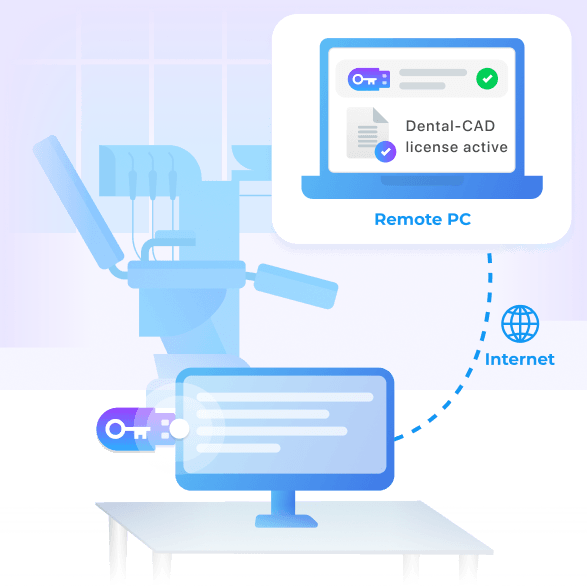
Donglify lets your technicians access their dental CAD license dongle from any workstation over the Internet. The dongle stays attached to one PC, and modeling can be done on a different, stronger workstation, a virtual machine, or a Remote Desktop session, as if the dongle was plugged into them.
4.5
rank based on 198+ users
Available on macOS 10.15+, Windows 7/8/10/11, Server 2008 R2/2012/2016/2019/2022, Windows 10/11 on ARM
The dongle is rarely at the workstation you need for modeling
In a busy lab, modeling power and the license dongle are usually on different machines. This can cause various issues.
Dongle needed on different PCs
Multiple workstations are used to model, view, and manage the designs.
Remote work is impossible
You couldn’t set up a remote workflow due to RDP passthrough failing to detect or properly connect the dongle.
Can’t model in a virtual machine
The software needs to run on a virtual machine, but the VM can’t redirect the USB dongle.
Re-plugging wears the dongle
The dongle’s connector can get worn out from being repeatedly attached and detached.
Donglify keeps the dongle on one PC and shares it
The dongle stays plugged into one lab PC, and any workstation connects to it over the Internet. Modeling can be done on any other machine, in a VM, or even over RDP.
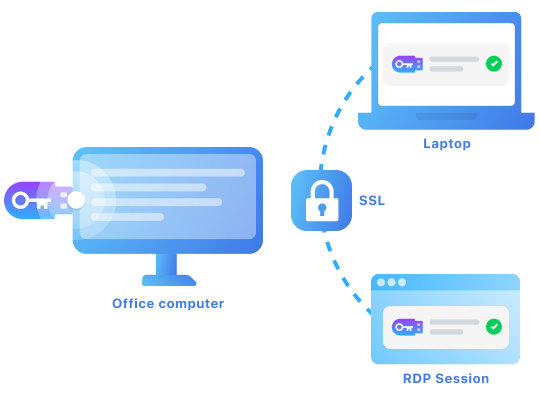
The dongle stays on one PC
There is no need to move the dongle around the lab, and the connector does not wear out from daily re-plugging.
Model over RDP or in a virtual machine
Forward the dongle into Remote Desktop sessions and virtual machines to use licensed software in these environments.
Connect a clinic to a remote lab
A clinic and a remote lab can share one dongle over a secure connection, with access you control.
Share a USB dongle in four steps
You set it up once, then the dongle is reachable over the Internet from any machine, including a virtual machine or a Remote Desktop session.
1
Sign up
Create a Donglify account and start the free demo.
2
Install
Install Donglify on the machine that holds the dongle and on each machine that needs it.
3
Share
Plug in the USB dongle, click the plus button, and select the dongle to share.
4
Connect
On the other machine, click Connect. The dongle works as if it were plugged in locally.
Works with your USB dongle
Donglify works with USB license dongles for dental CAD software. It forwards dongles over the Internet, even to destinations like Remote Desktop sessions and virtual machines, where physical dongles are usually hard or impossible to access. The dongle can stay attached to a single lab PC, and modeling can be done anywhere else.
How labs and clinics use it
Powerful workstation
A technician models on a fast workstation while the dongle stays on another lab PC.
Remote Desktop
A technician designs over Remote Desktop on a lab server, and the dongle is forwarded into the session.
Clinic and lab
A clinic and a remote dental lab share one dongle over the network.
Why labs and clinics use Donglify
Secure communication
2048-bit SSL encryption protects every shared dongle.
Acts like a local dongle
The software reads the remote dongle as if it were plugged into the same machine.
Reach it from several machines
One dongle can be available to more than one machine.
Access you control
Grant access per user and revoke it at any time.
What customers say
Donglify is the true savior for the hardware key we use to access our printer station. We used to physically reattach the poor thing from my colleague’s PC into mine and beck every time one of us had a printing job. And that’s far more than a dozen times every single business day. Now, we rely on dongle sharing, and whoever needs the printer just connects to the key over the network. The printer’s software sees no difference at all.
Rafael West
I used Donglify to help a client with a remote setup for their licensed software. Instead of physically shipping USB dongles, I connected them remotely using this tool. It saved a lot of time and effort. The software is user-friendly and provides a stable connection. Donglify is an excellent tool for anyone managing USB dongles in remote environments.
Ahmed Khan, Technical Support Engineer
Donglify was a perfect solution for sharing a USB dongle among my development team. We needed access to a single hardware license key for testing across different systems, and Donglify allowed us to use it remotely without any hassle. Its encryption feature gave us peace of mind, knowing the connection was secure. Highly recommended for distributed teams!
What customers say